Cash book – digital, compliant with the German GoBD, audit-proof
Cash payment from a customer, fuel receipt, screws from the DIY store: photograph the receipt, Bleno reads the amount and tax rate, lock the entry – done. At the end of the month the cash book extract automatically goes to your tax adviser’s office. No paper cash book, no catching up, no sweating over a tax inspection.
Photograph the receipt, AI fills it in
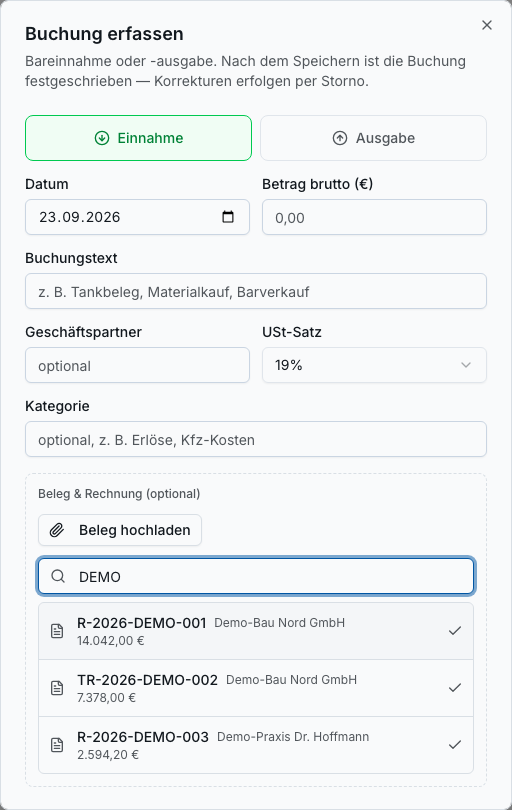
Upload the receipt or photograph it with your phone – Bleno reads the amount, date, business partner and tax rate. You check the suggestions and lock the entry. The receipt image stays right on the entry.
- Receipt photo or PDF directly on the entry
- AI fills in the fields from the receipt – you check them before locking
- Income or expense with booking text, category and VAT rate
- German and Austrian tax rates
Compliant with the German GoBD at no extra effort
The rules of the tax audit are built in: entries are numbered consecutively and locked, you correct mistakes by a reversing entry with a reason – nothing is deleted. Bleno does not allow a negative cash balance in the first place.
- Consecutive receipt numbers, locked entries
- Correction only by cancellation with a reason – fully traceable
- Running cash balance, protection against a negative balance
- Procedural documentation at the push of a button (German GoBD; Austria: Austrian BAO and Cash Sales Regulation)
Book cash payments from customers directly
If a customer pays in cash, you link the cash entry to their invoice. Bleno posts the income to the cash book and marks the invoice as paid at the same time – no entering it twice, no open invoice that has actually long been settled.
- Link a cash entry to an outgoing invoice
- Invoice is automatically marked as paid
- Outstanding invoices stay accurate
- Income appears in the cash balance
Several cash registers, one export
Keep separate cash registers, for example for the workshop, shop or building site – each with its own opening balance. The extract per cash register goes to your tax adviser as CSV or as a German DATEV booking batch, automatically in the monthly package together with invoices and incoming receipts.
- Any number of cash registers with opening date and opening balance
- Export per cash register as CSV or as a German DATEV posting batch
- Cash book and cash receipts automatically in the monthly package for your tax adviser
- Cash receipts via the German DATEV receipt sync as receipt type “Kasse” (cash)
Benefits
Cash book: what it does for you
- No paper cash book, no catching up at the end of the month
- Receipt photographed, entry in seconds
- Ready for a tax inspection
- Cash payments from customers without entering them twice
- Your tax adviser gets everything automatically
- Included in your plan – no separate cash book software
FAQ
Frequently asked questions
Yes. Every entry is numbered consecutively and locked. Corrections are only possible by a reversing entry with a reason, nothing is deleted, and a negative cash balance is prevented. Bleno generates the procedural documentation for the tax audit at the push of a button.
No. The cash book documents cash income and expenses. If you need an electronic cash register (e.g. a shop with the TSE requirement in Germany or RKSV in Austria), you keep using it; Bleno does not replace it.
Automatically in the monthly package – as an extract per cash register in CSV format together with the cash receipts. If your tax adviser works with the German DATEV system, you can additionally export the cash book as a DATEV booking batch or transfer the cash receipts via the DATEV receipt sync.
Yes. Create as many cash registers as you need – for example for the workshop and the shop – each with its own opening balance and its own extract.
Matching features
These features work hand in hand in your daily work. You'll find all the others in the overview.
Accounting & tax advisers
Receipts, invoices and the cash book go to your tax adviser automatically – as a monthly package or via DATEV document sync in Germany.
Learn more – Accounting & tax advisers →Incoming invoices
Supplier invoices and delivery notes recognised by AI and assigned to the right project.
Learn more – Incoming invoices →Bank reconciliation
Match bank transactions with invoices automatically and pay supplier invoices.
Learn more – Bank reconciliation →Quotes & invoices
Create professional quotes, order confirmations and invoices in minutes.
Learn more – Quotes & invoices →Ready to get started?
Try Bleno free for 14 days, with no obligation. No credit card required.